
Sony and many other companies has launched the USB Flash Drives Compatible with both Smart Phones and Computers/Laptops..
As the charging pin of all the Smart Phone is similar, This has became possible..
Smartphone USB transfers files from your Android smartphone or tablet to your computer using its dual micro USB and USB 2.0 connections. No cords or network needed.
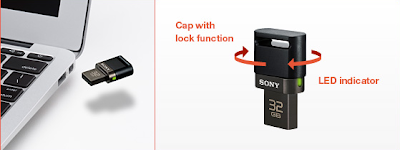
- Backup and transfer photos or video content from your smartphone, tablet to PC.

- Store your favourite photo/video/music files on the SA1 device and enjoy them on your smartphone or tablet.
- Smartphone USB makes sharing photos between your smartphone and your friend's smartphone quick and easy.
- Stylish Design incorporating dual connectors in ultra-compact size suits for using with smartphone/tablet.
- The cap protects micro USB port with its smart lock function It also supports plugging/unplugging into(/from) PC.
- Durable metal body and strap hole, good for using on-the-go.
- Manage (Copy/Delete/Playback/Sort) files from your smartphone, with dedicated application "File Manager", free download from Google Play
- Easy File Search Able to search photo/video/music files among all the files in internal memory/micro SD card/USM-SA1, or specific search by "Browse folders".
- Auto Start-Up*Just plug-in SA1 to smartphone/tablet and "File Manager" automatically starts up.*not guaranteed with all the smartphones.
- Quick UnmountDirectly access to "unmount USB storage" at File manager's pull-down menu, no need to open "Setting" menu.
- Capacity Size 8/16/32GB

 One feature I’m on the fence about is bundling. When you get an email, Inbox will automatically determine what category the email should go in. For example, if you get a flight confirmation it will automatically put it in your travel bundle. There are seven pre-set bundles: travel, purchases, finance, social, updates, forums and promos. You do have the option to create additional bundles with customizable rules. So the daily email update from your mom can go straight to a bundle instead of your inbox.


 The biggest potential problem is that, as the app is right now, you can’t use email addresses that end in something other than @gmail.com. That means that I can’t use my work email on Inbox, which forces me to go to Gmail for any work-related emails. This also means that I get notifications from two different apps for the emails. There also isn’t any word on whether Inbox will support POP3 or IMAP, which is a feature


